
Build a Second Brain in 45 Minutes for Adults With ADHD
Build a Second Brain in 45 Minutes for Adults With ADHD
A second brain for ADHD is an external system, part notebook, part app, part ritual, that catches every task, idea, and deadline your working memory drops before it hits the floor. It works because it moves the job of remembering off a brain that treats memory as optional and hands it to a system built to hold it. Done right, it cuts the mental noise enough that you can actually focus on the thing in front of you.
TL;DR:
- A second brain reduces mental clutter by capturing and organizing every task and idea, which is especially vital given ADHD brains’ limited and quickly-leaking working memory.
- Using dedicated roles like a universal capture, inbox, notes, task manager, calendar, and search helps prevent decision fatigue caused by overlapping app functions.
- Opting for simple, low-friction tools and automating or semi-automating filing processes minimizes maintenance and supports consistent system use.
- Building a system takes less than an hour, focusing on one tool per role, daily quick reviews, and a flexible rhythm to accommodate inevitable missed days.
- Coaching and structured workbooks can improve system adherence, especially when personalized to match individual routines and account for potential lapses.
Table of Contents
- Why a Second Brain Helps ADHD: The Cognitive Case
- Core Components Your ADHD-Friendly Second Brain Needs
- How to Choose Tools: AI-Native, Simple Apps, or a Hybrid
- Build a Second Brain in One Sitting This Week
- Maintenance Rhythms That Don’t Require Superhuman Consistency
- Common Pitfalls ADHDers Hit, and Quick Fixes
- How ADHD Coaching Helps You Actually Use This System
- Fitting Your Second Brain Around Therapy and Medication
- What Working Second Brains for ADHD Actually Look Like
- What the Research Says About Externalizing ADHD Memory
- What Tends to Work: A Coach’s Honest Take
- Guided Help: Coaching, Workbooks, and Starter Packs If You Want Support
- Sources
- FAQ
Why a Second Brain Helps ADHD: The Cognitive Case
Most people’s working memory holds a handful of items at a time. ADHD brains typically hold fewer, and what they do hold leaks out faster, especially under stress or boredom. That’s not a character flaw. It’s a wiring difference, and it’s exactly why trying to “just remember” your to-do list sets you up to fail before you start.
A second brain works around this by splitting the job into three moves: capture, route, retrieve. You get the thought out of your head the instant it appears, a system files it somewhere predictable, and you can find it later without relying on memory at all. Clinical literature on ADHD executive function backs this kind of externalized structure as a legitimate, evidence-supported intervention, not a workaround for people who “just need to try harder.”
This pairs naturally with therapy-based skills. Cognitive behavioral therapy is an effective non-medication treatment that helps adults build self-regulation, and a second brain gives those skills something concrete to act on.
- Capture removes the burden of holding information in your head.
- Routing removes the burden of deciding where things go in the moment.
- Retrieval removes the burden of trusting your memory to resurface anything on time.
Core Components Your ADHD-Friendly Second Brain Needs
Forget app names for a second. What you actually need is a set of roles, and each role should be filled by exactly one thing.
- Ubiquitous capture. Something you always have on you: a phone widget, a voice memo app, or a tiny paper pocket notebook that lives in your bag.
- Inbox. A single landing zone where every capture goes first, unsorted. No decisions allowed here, just dumping.
- Notes or reference store. Where information you’ll need again lives: project details, passwords hints, ideas you’re not ready to act on.
- Task manager. One list of things you’re going to do, each with an owner (you) and ideally a deadline.
- Calendar. For anything tied to a specific time or date, no exceptions.
- Retrieval or search. The ability to find anything, fast, without scrolling through six apps.
Role separation matters more than most people realize. When your notes app also tries to be your task manager also tries to be your calendar, you end up re-deciding what something is every time you look at it. That’s decision fatigue disguised as organization.
Keep entry points low-effort on purpose. A voice note while you’re driving. A quick-add widget on your home screen. A pocket notebook that never requires you to open an app. The PMC review on ADHD interventions supports this kind of low-barrier, behavior-based structure as genuinely effective, not just a nice idea.
How to Choose Tools: AI-Native, Simple Apps, or a Hybrid
There’s no single right tool, but there’s a wrong way to choose one: picking based on features instead of friction.
Ask yourself four things before committing to anything:
- Maintenance overhead. Will this still work if you ignore it for two weeks?
- Speed of capture. Can you get a thought in within five seconds?
- Privacy. Where does your data live, and who can see it?
- Offline access. Does it work when your signal doesn’t?
AI-assisted routing, tools that let you dump a messy voice note or text and have it automatically sorted into the right list, can meaningfully cut maintenance because you skip the filing step entirely. The trade-off is usually cost and, depending on the tool, less control over where your data sits. A simple app setup (a notes app plus a task manager plus a calendar) costs less and keeps things local, but you do the filing yourself every time.
Most ADHD adults land somewhere in the middle: one effortless capture point, automatic or semi-automatic routing into an inbox, and simple reminders for anything time-bound.
Pro Tip: If you’re not sure which camp you’re in, start with the cheapest, dumbest version of the system for one week. Upgrade only the piece that actually breaks, not the pieces you assume will break.
Build a Second Brain in One Sitting This Week
You don’t need a weekend. You need about 45 minutes and permission to build something imperfect.
- Pick exactly one tool per role. One capture method, one notes home, one task manager, one calendar. Write the four choices down so you stop relitigating them later.
- Create your brain dump template. One blank note or list titled “Everything,” where you empty your head for ten minutes. Anything actionable gets moved to your task manager afterward.
- Build your end-of-day three-item plan. Every evening, pick the three tasks that matter most for tomorrow and put them, and only them, at the top of your task list.
- Write a re-entry checklist. A five-line note that answers: what was I working on, what’s the next tiny step, what deadline is closest, what did I capture but not process, what do I need to check my calendar for.
- Set one automation. A phone shortcut, an email filter, or an app rule that routes captures into your inbox without you touching a menu.
- Trial it for seven days. Track one metric only: did you check your inbox at least once a day? That’s it. Not perfection, just contact.
The PMC review on ADHD executive function backs exactly this kind of small, behavior-first setup over elaborate systems that look impressive but collapse under real use.
Pro Tip: Give every task a concrete “by when,” even a fake one. ADHD brains respond to deadlines as agreements, and vague deadlines get treated like they don’t exist.
Maintenance Rhythms That Don’t Require Superhuman Consistency
Your system doesn’t need daily perfection. It needs a rhythm you can return to after falling off it, because you will fall off it.
- Daily micro-check: glance at three things only, today’s plan, your inbox, your calendar.
- Weekly ten-minute tidy: clear your inbox to zero, even if “clearing” means moving things to “someday.”
- Re-entry rule: if you’ve missed a week, you’re not behind, you’re just starting a new week. Skip the guilt audit.
Anchor these to something you already do without thinking. Check your inbox with your morning coffee. Do the weekly tidy while your laundry runs. Research on remote-work routines backs this kind of habit-stacking as one of the more reliable ways to make a new behavior stick without relying on willpower alone.
Body doubling, timers, and sensory cues (a specific playlist, a specific mug) all help signal to your brain that it’s time to re-enter the system. Techniques like zoning and body doubling are backed as genuinely effective for task initiation in adults with ADHD, not just pleasant extras.
Common Pitfalls ADHDers Hit, and Quick Fixes
- Overcomplex tagging and folders. Fix: collapse back to the six roles. If you can’t explain your filing system in one sentence, it’s too complicated.
- App-hopping every few weeks. Fix: give any new tool a 72-hour minimum viable test before switching, and only switch one role at a time.
- Abandonment after a rough week. Fix: automate the capture step so the system keeps working even when you’re not actively maintaining it, then schedule one re-check to catch up.
- Ignoring privacy settings. Before trusting a tool with sensitive notes, check where it stores data and whether it’s encrypted. This matters more with AI-assisted tools than with a plain note app.
How ADHD Coaching Helps You Actually Use This System
Estelle has worked with self-employed ADHDers, creative freelancers, and impact-driven founders long enough to know the system on paper is never the hard part. The hard part is the week you forget it exists.
ADHD business coaching personalizes the rhythm, not just the tools, so your check-ins match your actual attention patterns instead of a generic template. For clients using Access to Work coaching, that structure gets built around workplace accommodations too. After four to six weeks, coaching clients typically report fewer dropped tasks and less end-of-day panic, not a flawless system, just one they trust enough to keep opening. Learn more about executive function coaching.
Fitting Your Second Brain Around Therapy and Medication
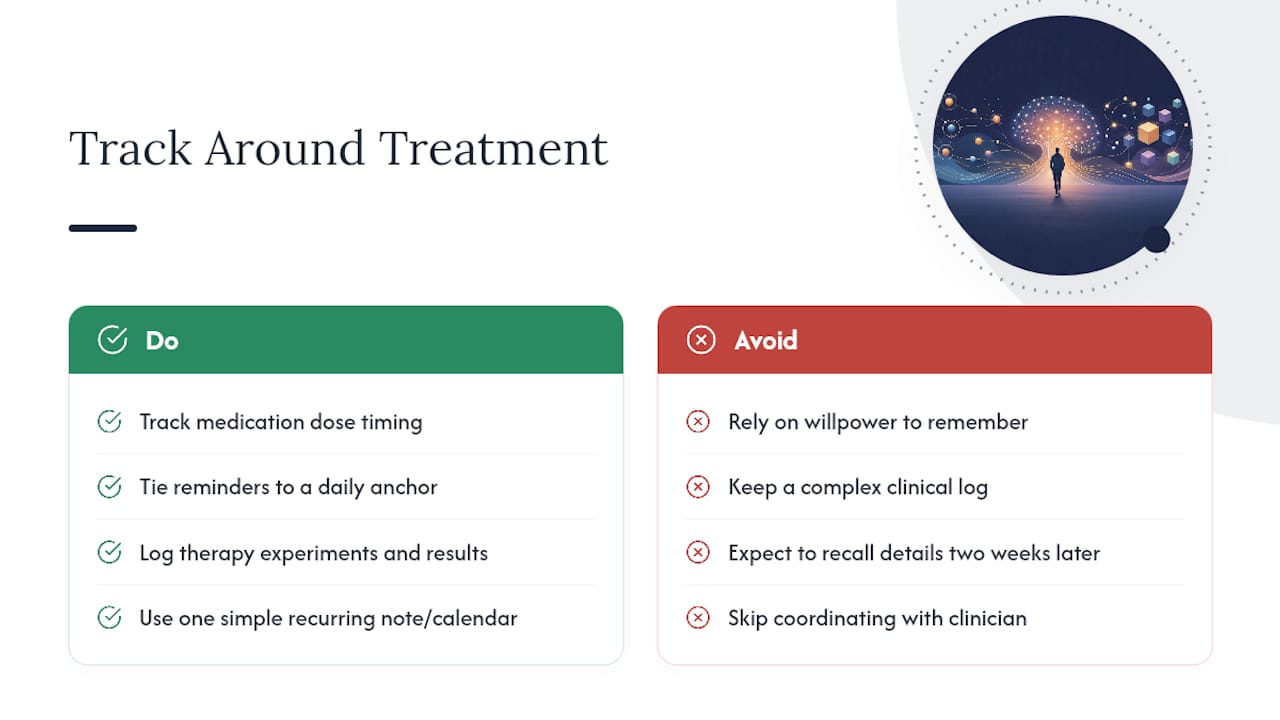
A second brain isn’t a replacement for treatment, it’s the scaffolding that makes treatment actually usable day to day. If you’re on ADHD medication, your system should track dose timing, not just tasks. A recurring calendar reminder tied to a fixed daily anchor (breakfast, brushing teeth) does more for medication adherence than trying to remember on willpower alone, especially since ADHD itself affects time perception in ways that make “I’ll just remember” an unreliable plan.
If you’re in therapy, your system becomes the bridge between sessions. CBT for ADHD often assigns concrete behavioral experiments, try a new task-starting ritual for a week, track what happens, and your notes store is the natural place to log that data instead of trying to recall it from memory two weeks later. This is one of the reasons CBT-based strategies work better alongside an external system than on their own.
Coordinate with your prescriber or therapist on what actually needs tracking. Some people track mood alongside medication changes. Others just need appointment reminders and a place to jot side effects before they forget by the next visit. Keep this section of your system dead simple: a single recurring note or a shared calendar with color coding is usually enough. The goal isn’t a clinical log, it’s removing one more thing your brain has to hold onto during an already demanding process.
What Working Second Brains for ADHD Actually Look Like
The systems that survive contact with real ADHD life share a pattern: they’re boring, small, and hybrid.
One common setup pairs a single paper notebook for capture, kept physically on the person, with a digital task manager checked twice a day. The paper handles the speed problem (nothing beats scribbling mid-conversation), while the digital side handles retrieval and deadlines. Neither tool tries to do the other’s job.
Another version, popular among creative freelancers juggling multiple clients, uses AI-native capture tools that let you dump a voice memo mid-project and have it automatically summarized and filed by project name. One documented approach uses persistent AI context, where the tool remembers your projects and preferred style, so messy, unfiled captures still become usable without manual sorting later. That’s a meaningful shift for people who abandon systems purely because filing feels like a second job.
The through-line across every system that actually lasts: minimal roles, forgiving re-entry, and a structure that survives being ignored for a week. The systems that fail are almost always the ones trying to be comprehensive on day one. Comprehensive is the enemy of used.
What the Research Says About Externalizing ADHD Memory
The case for externalizing memory isn’t just anecdotal comfort. Working memory capacity in most adults tops out around four to seven items, and ADHD brains typically hold fewer items for shorter stretches, which is precisely why relying on internal recall for task management sets people up for frustration rather than failure of will.
Clinical reviews of ADHD interventions consistently support behavioral and organizational strategies, external structures, environmental cues, written prompts, as legitimate treatment components rather than lifestyle add ons. The PMC review on ADHD and executive function frames this kind of scaffolding as core to managing the condition, not a workaround for people who haven’t tried hard enough.
There’s also a design insight worth taking seriously: rigid daily routines tend to underperform forgiving rhythms for ADHD adults specifically because rigidity punishes the inevitable off day. Systems built with easy re-entry points, no penalty for a missed check-in, no cascading failure when one day gets skipped, tend to survive longer than perfectly optimized ones. That’s not a workaround either. It’s the design principle that separates second brains people actually keep using from the ones abandoned in month two.
What Tends to Work: A Coach’s Honest Take
Clients almost never need more features. They need fewer roles, filled consistently, with permission to miss a day without starting over. There’s a real trade-off between convenience and privacy, and between simplicity and completeness, and no system gets both for free. The most useful reframe I offer: your system isn’t a moral test you’re failing. It’s a favor to your future self, one that works whether or not you feel motivated today.
— Estelle
Guided Help: Coaching, Workbooks, and Starter Packs If You Want Support
Building a second brain solo works for some people. For others, especially self-employed creatives juggling client work, invoices, and their own executive function on top of it all, having someone else hold the structure changes everything. That’s where ADHD business coaching for impact-focused entrepreneurs and creative freelancers comes in: sessions built around your actual work rhythm, not a generic productivity template, with accountability that doesn’t rely on you remembering to check in.
If you’re newly diagnosed or rebuilding a system that’s collapsed before, a first consult usually starts with mapping where your current setup leaks, not handing you more apps. For readers using Access to Work coaching support, this also covers workplace accommodations alongside your personal system. If coaching isn’t the right fit yet, the Empowering ADHD Workbook for Women and other guided workbooks give you structured exercises to build a starter system on your own timeline.
Ready for an ADHD accountability partner who actually understands executive function? Book a coaching session and bring your messiest to-do list. That’s the best place to start.
This article is general information, not a substitute for advice from a qualified doctor. Consult a qualified healthcare professional about your own circumstances before acting on anything here.
Sources
- For adults with ADHD — using smart strategies to start and complete tasks can make all the difference
- PMC review article on ADHD and interventions
- Time-management tips for adults with ADHD
- Cleaning and organization tips for ADHD
FAQ
Do People With ADHD Have Multiple Thoughts at Once?
Many adults with ADHD describe rapid, overlapping thoughts rather than one at a time, often called a racing or overactive mind. A second brain helps by giving each thought a landing spot the instant it appears, so it stops competing for attention with everything else.
Can ADHD Cause an Overactive Brain?
ADHD is linked to differences in attention regulation that can feel like a mind that won’t slow down, especially with unfinished tasks or unresolved decisions. Externalizing those open loops into a capture system is one of the more effective ways to quiet that noise without relying on willpower.
How Do You Quiet an ADHD Brain?
Getting thoughts out of your head and into a trusted external system, a notebook, a task manager, a calendar, reduces the mental load of trying to hold everything at once. Pairing that with grounding techniques like timers or body doubling adds another layer of calm, as organization and cleaning techniques for ADHD suggest.
Why Do People With ADHD Get Racing Thoughts Before Bed?
Bedtime often removes the daytime distractions that were quietly suppressing unfinished tasks and unresolved worries, letting them surface all at once. A nightly “brain dump” into your second brain’s inbox, done an hour before bed, gives those thoughts somewhere to go besides your head.
What Does Estelle-Rose’s ADHD Coaching Actually Include?
Coaching includes personalized sessions covering system design, accountability, and support for self-employed adults, including those using Access to Work coaching. Pricing details are available directly on the coaching page.

